In its simplest form this file is a list of names and email addresses which might
look like this –
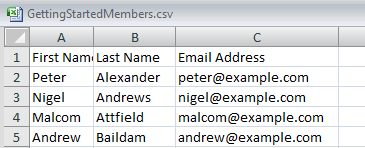
You can also provide information such as postal addresses, phone numbers and more
for each member, but you don’t have to. All you need is each member’s name and his
or her email address. (And if you don’t have an email address that can be omitted
too.)
It is essential that the column headings used are exactly as defined here The only columns which must be present are First Name, Last Name,
and Email Address. If you do include additional columns then their column
headings must be exactly as defined.
The only columns which must be present are First Name, Last Name,
and Email Address. If you do include additional columns then their column
headings must be exactly as defined.
Most membership systems provide a way to export information in a file which can
be opened and edited in a spreadsheet program such as Microsoft Excel. Alternatively your
club may already use spreadsheets to hold membership records. If your records are
held on paper or in some other way then you may need to create a file of members
from scratch. This is most easily done using a spreadsheet.
Whatever the source of your member information the resulting file must be saved
as type CSV (comma-separated values). CSV is a Save As option in spreadsheet
programs.