In its simplest form this file is a list of dates, times, events and duties which
might look like this –
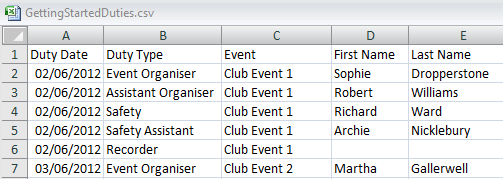
The minimum information required for each duty is its date, event and duty type.
Usually there is a member name against each duty but the name can be left blank
if the duty is yet to be allocated.
Important: Member names in lists of duties must match the corresponding names
in your list of members exactly.
It is essential that the column headings used are exactly as defined here The only columns which must be present are Duty Date, Duty Type, Event,
First Name and Last Name. If you do include additional columns, such
as instructions specific to a duty, then their column headings must be exactly as
defined.
The only columns which must be present are Duty Date, Duty Type, Event,
First Name and Last Name. If you do include additional columns, such
as instructions specific to a duty, then their column headings must be exactly as
defined.
You may well be maintaining your duty roster in a similar format already in which
case all you need do is modify column headings.
Your completed file of duties must be saved as type CSV (comma-separated
values). CSV is a Save As option in spreadsheet programs such as Excel.
More information
You can read more about creating lists of duties in the DutyMan Administrators' Guide